相信把 Firefox 當做主要瀏覽器的人都曉得,當遇到過長的網址或是一串英文字母時,就會把網頁的版面撐開。
這時就得藉助擴充套件來幫我們解決這個問題: MR Tech Link Wrapper (支援 Firefox 2.0)。
我們來看以下兩張圖片便能知道安裝這個套件的前後差異:
安裝前:過長的網址撐開寬度為 300px 的表格。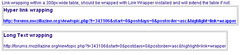
安裝後:過長的網址會自動斷行,使表格不遭到破壞。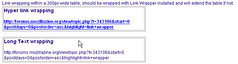
安裝 MR Tech Link Wrapper 重啟後會再 statusbar 出現一個”開啟/關閉”自動斷行功能的 icon。
當圖示為紅色的X時表示斷行功能關閉。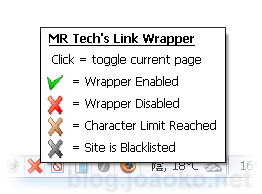
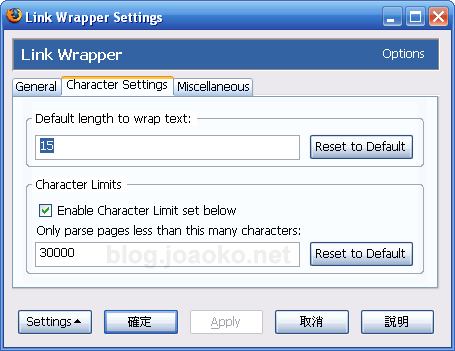
除此之外還能設定當網頁的文字超過某個大小時便不解析網頁,為的是不讓 Firefox 讀取巨大網頁時降低效能,預設值是 30k。
另外,還有一個 Lite 版本,最主要的差異便是沒有 statusbar 的圖示與設定介面。
要設定 Lite 版本得從 about:config 修改:
# length to wrap: link_wrapper.wrapLength, default value is “15”
# Sites to ignore: link_wrapper.ignoreList, default regex value is “mail.google.com|mail.yahoo.com|hushmail.com”
# html tags to ignore: link_wrapper.ignoreTags, default regex value includes tons of tags
# Enable page character limit to improve performance on large pages: link_wrapper.charLimitEnabled, default value is true
# If enabled use this character limit: link_wrapper.charLimit, default value is 30000