首頁 » Firefox 專區

[Firefox Add-ons] DownloadWith - 指定外部續傳軟體下載檔案

發表於 2006/12/30 | 分類: Firefox 專區 | 尚無迴響 | 瀏覽數: 6,957 個瀏覽人數
http://blog.joaoko.net/archives/216

DownloadWith 是一個跟 FlashGot 類似但是卻比 FlashGot 輕巧的擴充套件,大小只有 24.6 KB。
它除了沒有 FlashGot 的「下載所有分頁的連結」之外,其他 FlashGot 的功能它都具備了。
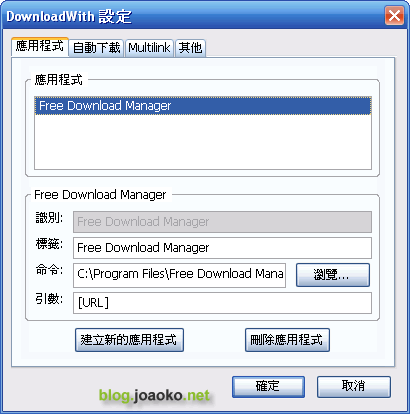
並且還可以指定續傳軟體的位置給 DownloadWith,這比起 FlashGot 預先幫你設定好軟體的位置來說,自由度是大大的提高了,因為如果你的續傳軟體不是裝在預設的 C:\ProgramFliles 的話,FlasGot 就偵測不到續傳軟體的存在。
不想裝肥大的 FlashGot 嗎?DownloadWith 是一個不錯的替代方案

DownloadWith 的下載頁面: 請按我

downloadwith (by joaoko)

Leave your response!

Add your comment below, or trackback from your own site. You can also subscribe to these comments via RSS.

Be nice. Keep it clean. Stay on topic. No spam.

You can use these tags:
<a href="" title=""> <abbr title=""> <acronym title=""> <b> <blockquote cite=""> <cite> <code> <del datetime=""> <em> <i> <q cite=""> <strike> <strong>

This is a Gravatar-enabled weblog. To get your own globally-recognized-avatar, please register at Gravatar.