首頁 » Firefox 專區

[Firefox Add-on] InFormEnter - 輸入常用的文字到表單

發表於 2006/11/28 | 分類: Firefox 專區 | 尚無迴響 | 瀏覽數: 3,195 個瀏覽人數
http://blog.joaoko.net/archives/153

你經常在論壇、網站上留言嗎?或你是拍賣網站的賣家並且經常在回答內容中輸入同樣的文字?
當有以上需要時,那你就一定得試試 InFormEnter 這個擴充套件。
它的主要功能就是可以把一些經常輸入的文字先存起來,等到要用時只需要按幾次滑鼠就可以自動幫我們輸入文字。
例如在網站留言時,就可以用它來輸入簽名檔或是個人網址。

當安裝完 InFormEnter 後會在狀態列及網頁上所有表單的右邊顯示這個圖示:
informenter_03 (by joaoko)

在狀態列的這個圖示上面按右鍵可以啟動或是關閉 InFormEnter 的功能。

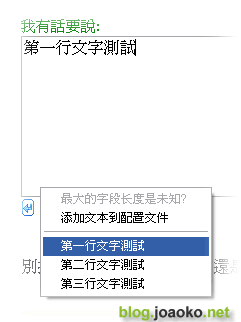
圖1:要輸入文字時就在表單右邊的圖示按左鍵便可以叫出預先儲存的文字,然後再選擇文字就可以自動輸入了。
informenter (by joaoko)

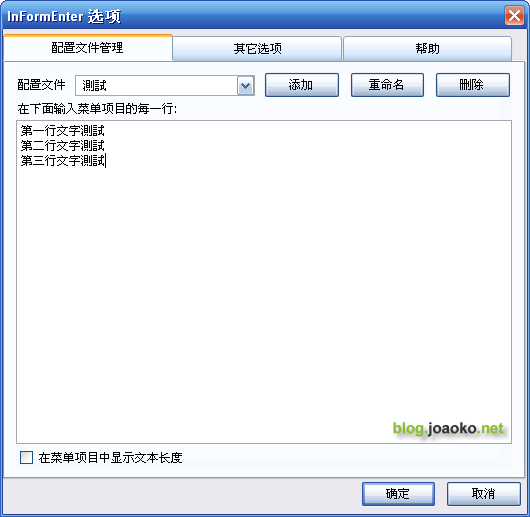
圖2:儲存常用的文字 (在選項裡設定):

informenter_02 (by joaoko)

Leave your response!

Add your comment below, or trackback from your own site. You can also subscribe to these comments via RSS.

Be nice. Keep it clean. Stay on topic. No spam.

You can use these tags:
<a href="" title=""> <abbr title=""> <acronym title=""> <b> <blockquote cite=""> <cite> <code> <del datetime=""> <em> <i> <q cite=""> <strike> <strong>

This is a Gravatar-enabled weblog. To get your own globally-recognized-avatar, please register at Gravatar.