首頁 » Firefox 專區

[Firefox Add-ons] Gmarks - 把 Google Bookmarks 的書籤搬到 Firefox

發表於 2006/12/10 | 分類: Firefox 專區 | 有 1 則迴響 | 瀏覽數: 7,395 個瀏覽人數
http://blog.joaoko.net/archives/170

話說電腦的脾氣陰晴不定,要是那一天不爽搞罷工很有可能重要檔案就這樣飛了。
所以養成定期備份的習慣才能防患於未然。
書籤檔案也是如此,因為那可是這幾年上網所累積下來的精華啊。
Google 有個服務叫 Google Bookmarks,可以讓我們把書籤存在網路上,這樣還有另一個好處就是可以在不同的地方存取。
那麼就來介紹今天的主角吧: Gmarks
它的主要功能就是直接在 Firefox 存取 Google Bookrmarks 上的書籤,功能列表如下:

  1. 從 Firefox 匯入書籤到 Google Bookmarks
  2. 從 Google Bookmarks 匯出書籤到 html 檔案
  3. 新增/刪除/編輯 Google Bookmarks 的書籤
  4. 搜尋 Google Bookmarks 中的書籤

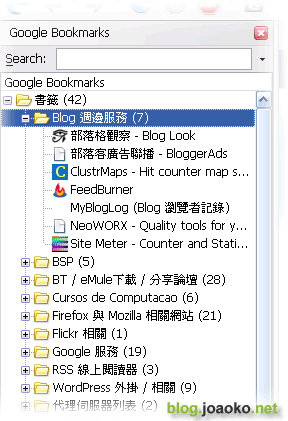
圖1: 側邊欄中的書籤
gmark_01 (by joaoko_firefox)

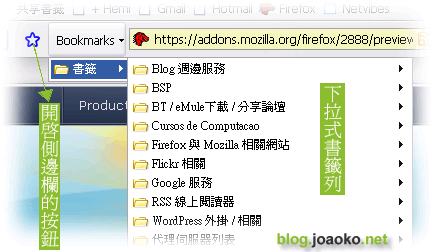
圖2: 下拉式的書籤列
gmark_02 (by joaoko_firefox)

圖3: 加入書籤到 Google Bookmarks (可同時加入到 Firefox 本地書籤)

gmark_03 (by joaoko_firefox)

有 1 則迴響 »

  • 高藥師 said:

    最近看到有google書籤分享的功能

    大大可以介紹一下嗎??

    另外我最近做了一個籤詩網
    http://game543.blogspot.com

    你可以去玩玩看
    不錯的話
    幫我介紹一下喲!!

Leave your response!

Add your comment below, or trackback from your own site. You can also subscribe to these comments via RSS.

Be nice. Keep it clean. Stay on topic. No spam.

You can use these tags:
<a href="" title=""> <abbr title=""> <acronym title=""> <b> <blockquote cite=""> <cite> <code> <del datetime=""> <em> <i> <q cite=""> <strike> <strong>

This is a Gravatar-enabled weblog. To get your own globally-recognized-avatar, please register at Gravatar.