首頁 » Firefox 專區

[Firefox Add-ons] Link Alert - 不會再讓我們點錯連結了

發表於 2006/12/15 | 分類: Firefox 專區 | 尚無迴響 | 瀏覽數: 2,782 個瀏覽人數
http://blog.joaoko.net/archives/182

我相信我們常常都會遇到下列這種情況,當我們不知道連結目標的類型是什麼的時候,會習慣的把滑鼠停在連結上面,然後再看狀態列顯示的網址。
或著有時候是不管三七二十一,直接就點下連結,然後就後悔了,因為連結檔案類型並或是開啟方式不是我們想要的。

但是這種情形在裝了 Link Alert 之後就不會再發生了。
當我們把滑鼠停在一個連結上時,cursor 旁邊會出現一個對應的小圖示,例如連結目標是一個 zip 檔時就會顯示 Winzip 的圖示。
或是當連結會以新視窗開啟時就會下面這樣:

除了可以選擇那一些圖示要出現之外,我們還可以依照連結檔案的類型新增自訂的小圖示。
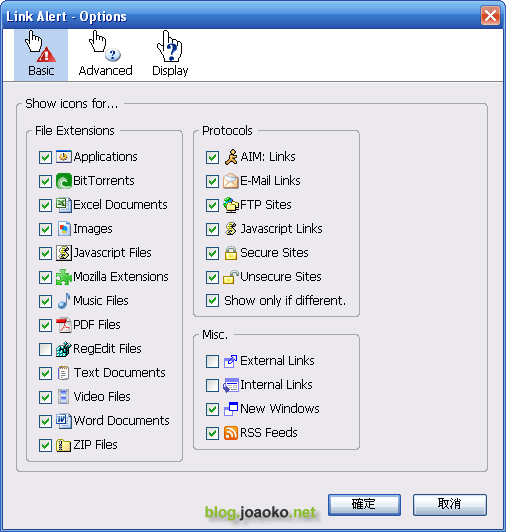
link_alert (by joaoko)

Leave your response!

Add your comment below, or trackback from your own site. You can also subscribe to these comments via RSS.

Be nice. Keep it clean. Stay on topic. No spam.

You can use these tags:
<a href="" title=""> <abbr title=""> <acronym title=""> <b> <blockquote cite=""> <cite> <code> <del datetime=""> <em> <i> <q cite=""> <strike> <strong>

This is a Gravatar-enabled weblog. To get your own globally-recognized-avatar, please register at Gravatar.