首頁 » Firefox 專區

[Firefox Extension] Showcase - 把每個分頁都變成縮圖方便尋找

發表於 2006/10/18 | 分類: Firefox 專區 | 尚無迴響 | 瀏覽數: 2,877 個瀏覽人數
http://blog.joaoko.net/archives/117

今天來介紹一個能讓我們有不同的瀏覽體驗,而且又新奇的擴充套件:Showcase

以我讀 Google Reader 的習慣來說,如果不是那麼迫切等待閱讀的文章我會先在背景打開新分頁。
可能不用半個小時,就一大堆分頁躺在上面等著你點他。但我們都知道,分頁一多,分頁上的標題就不那麼容易被閱讀,在這種情形之下 Showcase 能幫我們把所有的分頁制成縮圖,讓我們一目瞭然,只要在縮圖上點一下就直接跳到該分頁。

就像下圖:
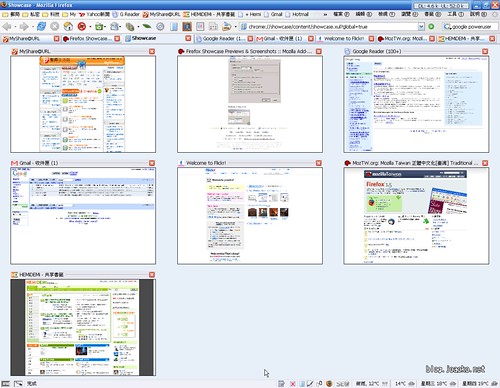
showcase_1

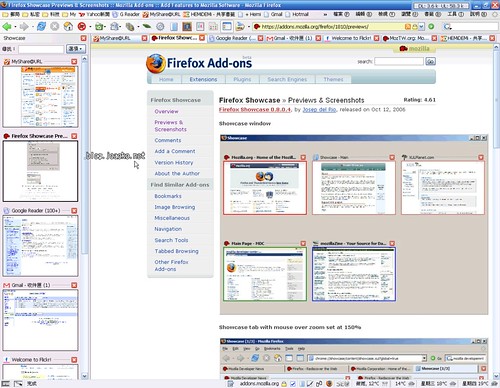
除了能在分頁裡顯示縮圖之外,還能顯示在側邊欄顯示:
showcase_2

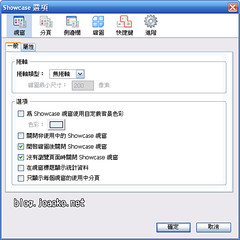
Showcase 的設定畫面:
showcase_3

順便提一下,新版的 Maxthon 2.0 也有內建此功能,叫做書籤管理器。

Leave your response!

Add your comment below, or trackback from your own site. You can also subscribe to these comments via RSS.

Be nice. Keep it clean. Stay on topic. No spam.

You can use these tags:
<a href="" title=""> <abbr title=""> <acronym title=""> <b> <blockquote cite=""> <cite> <code> <del datetime=""> <em> <i> <q cite=""> <strike> <strong>

This is a Gravatar-enabled weblog. To get your own globally-recognized-avatar, please register at Gravatar.