首頁 » Firefox 專區

[Firefox Add-ons] 網頁翻譯套件 - translator

發表於 2007/01/6 | 分類: Firefox 專區 | 尚無迴響 | 瀏覽數: 9,949 個瀏覽人數
http://blog.joaoko.net/archives/227

Translator 提供網頁翻譯的功能,它利用線上翻譯引擊進行網頁翻譯的工作,目前可以選擇以下這些網站來翻譯:

  • Google Translation
  • Yahoo! Babelfish
  • PROMT
  • freetranslation.com
  • Altavista
  • Im translator

這些網站都支援多國語言翻譯,當然翻譯出來的品質也不盡相同。但有個共通點是,英翻中出來的結果,我想大概只能當做娛樂性文章來閱讀吧 XD
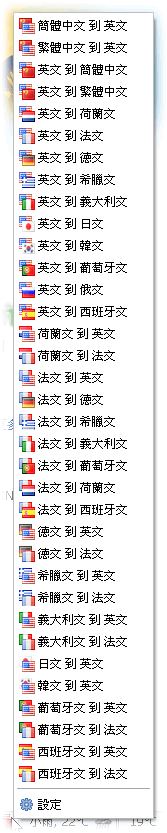
要使用 Translator 很簡單,安裝完之後會在 Firefox 狀態列顯示一個帶有兩面國旗的小圖示,按右鍵可以選擇要翻譯成那一國語言。

Translator 的下載頁面: https://addons.mozilla.org/firefox/3361/

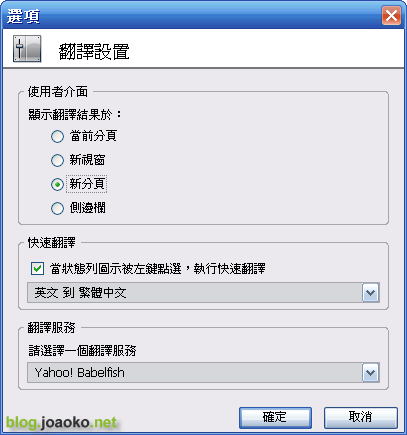
Translator 的介面抓圖:

圖1: 狀態列的小圖示
translator_02 (by joaoko)

圖2: 設定 Translator
translator_03 (by joaoko)

圖3: 狀態列圖示的選單
translator_01 (by joaoko)

Leave your response!

Add your comment below, or trackback from your own site. You can also subscribe to these comments via RSS.

Be nice. Keep it clean. Stay on topic. No spam.

You can use these tags:
<a href="" title=""> <abbr title=""> <acronym title=""> <b> <blockquote cite=""> <cite> <code> <del datetime=""> <em> <i> <q cite=""> <strike> <strong>

This is a Gravatar-enabled weblog. To get your own globally-recognized-avatar, please register at Gravatar.