我想大家可能都有遇過下列情況,複製網頁上含有格式的文字,然後貼在類似 Word 或是其他支援 RTF 格式的編輯器 (例如部落格的離線編輯器) 時,通常都會連網頁上的文字格式都貼上去,但其實我們只要它貼上純文字格式。
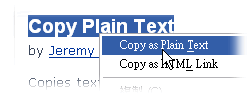
Copy Plain Text 便是為了解決這種問題而產生的擴充套件,它能夠把網頁上帶有格式的文字複製為純文字格式,然後在貼上時就不會有上述的問題。
Copy Plain Text 下載頁面: https://addons.mozilla.org/firefox/134/
我想大家可能都有遇過下列情況,複製網頁上含有格式的文字,然後貼在類似 Word 或是其他支援 RTF 格式的編輯器 (例如部落格的離線編輯器) 時,通常都會連網頁上的文字格式都貼上去,但其實我們只要它貼上純文字格式。
Copy Plain Text 便是為了解決這種問題而產生的擴充套件,它能夠把網頁上帶有格式的文字複製為純文字格式,然後在貼上時就不會有上述的問題。
Copy Plain Text 下載頁面: https://addons.mozilla.org/firefox/134/